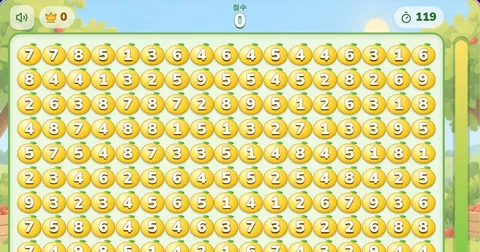
Drag a box around apples that add up to 10
Best 0
Each apple is 1 point. Clear as many as you can in 2 minutes
Play Apple Game (Fruit Box)
In Apple Game, box numbers that add up to 10. Each cleared apple earns 1 point; you have 120 seconds.
More Games
All ›













How to Play Apple Game
Apple Game is a free, two-minute make-10 puzzle. Drag a rectangle over numbered apples whose total is exactly 10, then release to remove them. Each removed apple earns 1 point, regardless of its printed number. These rules describe blockblast.co’s unofficial web version, inspired by GameSaien’s Fruit Box.
Rules and points · Practice position · Strategy · Controls and pause · Results · Troubleshooting
Apple Game Rules: Sum 10, Score by Apples
- Start a round to receive 170 apples, each numbered from 1 to 9.
- Drag from one corner of a rectangular group to the opposite corner. Every remaining apple inside the rectangle contributes to its total.
- Release when that total is exactly 10. A different total leaves the apples in place.
- Cleared cells stay empty. You can include those gaps in later selections; they contribute zero and earn no points.
- The timer gives you 120 seconds of active play. Clearing every apple finishes the round early with 170 points.
In Apple Game, the target sum and the score are different quantities. A 4+6 pair earns 2 points; a 2+3+5 rectangle earns 3; a rectangle containing 1+2+3+4 earns 4. Each totals 10, but the number of removed apples determines the points. The numbers must also fit together inside a valid rectangle—you cannot pick them from unrelated parts of the board.
Practice: Three Clears in Apple Game
This cropped Apple Game practice position shows three rows and three columns of a larger board. It is an example to follow, not a promised random opening. Count rows from the top and columns from the left:
| Position | Column 1 | Column 2 | Column 3 |
|---|---|---|---|
| Row 1 | 1 | 9 | 4 |
| Row 2 | 2 | 3 | 5 |
| Row 3 | 7 | 8 | 6 |
- Box row 1, columns 1–2. The 1+9 pair totals 10 and disappears. You gain 2 points.
- Box all three apples in row 2. The 2+3+5 group totals 10. You gain another 3 points, leaving that row empty within this practice region.
- Box column 3, from row 1 to row 3. It now contains 4, an empty cell and 6. The total is 10; two apples disappear for another 2 points.
Those three Apple Game selections remove seven apples and earn 7 points. Before the second move, that same column would contain 4+5+6=15 and would not clear. Empty cells create a new rectangle; the remaining numbers do not fall or shift after a clear.
Why a rectangle can fail
Apple Game counts every apple within the box, including its interior. Suppose a 2×2 region is 3, 4 on the top row and 2, 7 below. The diagonal 3 and 7 total 10, but enclosing both also includes 4 and 2: the rectangle totals 16, so nothing clears. Look for a narrower row, column or a different rectangle instead of counting only its corners.
Finding Better Apple Game Moves
Good Apple Game play starts with a consistent scan rather than random dragging. Check nearby pairs—1+9, 2+8, 3+7, 4+6 and 5+5—then look for compact groups of three or more apples. A larger valid group earns more points per drag, but spending too long finding one can cost you several easy clears.
- Check the whole shape. A promising pair is useful only if every other apple enclosed keeps the sum at 10. The sum preview helps confirm your selection before release.
- Revisit cleared areas. After a clear, scan along the empty row or column for newly connected numbers, as in the practice position above. A wide gap can be useful when its intervening cells are empty.
- Keep a scanning direction. Work across one area, then move to another when you stop finding matches. If no nearby pair is obvious, inspect longer rectangles through empty cells and small-number groups.
- Treat the order as a choice. A 9 needs a 1 to make 10; an 8 can use a 2 or two 1s. Check which rectangle is actually available before removing a small number needed by a nearby large one. No fixed opening order guarantees a perfect round.
For a faster Apple Game run, first practise accurate boxes without chasing a target score. Once invalid selections become rare, compare how many apples you clear with each drag and how quickly you find the next valid group.
Apple Game Controls, Portrait Layout and Pausing
Play Apple Game by clicking or touching the board, dragging a box and releasing it. A mouse, trackpad or finger works; the current web version does not offer the keyboard selection or hint controls found on some other sites.
In landscape, the board displays 17 columns × 10 rows. Portrait switches the same board to 10 columns × 17 rows; it changes the display arrangement, not the 170 apples or your score. Finish a drag before changing orientation, because turning the screen cancels the current selection.
Apple Game pauses when the page loses focus or becomes hidden, such as when you switch tabs. The paused board is covered and the timer stops counting that time. Return to the page to continue, or tap the paused overlay if it is still showing. This is still a timed round; there is no separate untimed or multiplayer mode here.
Apple Game Results and Your Best Score
An Apple Game round ends when active play reaches 120 seconds or when all apples have been removed. A full clear earns 170 points and shows the completion time. If you cannot find another selection, you can keep looking until the timer ends; the game does not automatically finish when you appear stuck.
The labels below are this site’s Apple Game score tiers, using the same thresholds as the results screen. They are not measured player averages, rankings or percentiles. A 100-point run means you removed 100 apples; it does not establish that you outranked a particular share of players. This version does not guarantee that every generated board can be fully cleared.
| Score | Tier | What it means |
|---|---|---|
| 0–59 | Beginner | Still learning the patterns |
| 60–99 | Progress | At least 60 apples cleared |
| 100–119 | High Score | At least 100 apples cleared |
| 120–169 | Challenge | At least 120 apples cleared |
| 170 | Perfect | Every one of the 170 apples cleared |
Your best result is stored in the current browser, not in a shared account or global leaderboard. Clearing site data or using another browser can change which best score you see. The current round is not saved across a reload. Use Play Again for a fresh board; after a result, Share sends or copies the result and page link.
When Apple Game Does Not Clear a Box
- The total is not 10: include all apples inside the rectangle in your calculation. Empty cells count as zero, but an uncleared apple between two others still counts.
- You saw 10 while dragging but nothing cleared: the selection at the release position decides the move. Check its final boundary; moving one cell farther can include another apple.
- Nothing happens before the round starts: press Start first. If the board is covered by Paused, return to the page or tap to resume before drawing another box.
- A touch drag is interrupted: a screen rotation or lost pointer capture cancels the selection. Start a new drag once the board is stable.
The Original Fruit Box and This Apple Game Version
This Apple Game is an unofficial remake by blockblast.co and is not affiliated with GameSaien. The original Fruit Box on GameSaien’s English site describes enclosing apples that total 10 and awarding one point per apple. Our Apple Game design, sound and portrait presentation are separate; rules or features on another remake do not automatically apply here.
For another make-10 puzzle, try Lemon Game. For a different number challenge, use strikes and balls to work out a hidden sequence in Number Baseball.
Apple Game FAQ
How do you play Apple Game?
Press Start and drag a rectangle over apples whose numbers total exactly 10. Release to remove them. Every uncleared apple inside the box counts toward the sum; each removed apple earns 1 point. The round lasts 120 seconds of active play, or ends early when all 170 apples are cleared.
Why does an Apple Game clear earn fewer than 10 points?
The target sum is 10, but points count apples rather than their printed values. A 4+6 pair earns 2 points. A rectangle containing 1+2+3+4 earns 4. Empty cells earn no points.
Can an Apple Game rectangle include empty spaces?
Yes. Cleared cells count as zero and can be included in a later box. For example, 3, two empty cells and 7 total 10 and remove two apples for 2 points. Every other uncleared apple enclosed still contributes to the sum.
Can I play Apple Game on my phone?
Yes, using a mobile browser and touch dragging. Landscape shows 17 columns by 10 rows; portrait displays the same board as 10 columns by 17 rows. Finish a selection before turning the screen, because an orientation change cancels the drag.
What is a good score in Apple Game?
Compare your runs with your saved best score. The score-tier labels on this site are chosen thresholds, not measured player averages, rankings or percentiles. Clearing all 170 apples gives the maximum of 170 points.
Is every Apple Game board possible to clear completely?
This web version does not guarantee a full clear on every board. It generates numbers whose total is a multiple of 10, but that condition alone does not guarantee a sequence of sum-10 rectangles. A strategy cannot promise a perfect 170.
Why does Apple Game pause when I change tabs?
Leaving the page or hiding it pauses the round and covers the board. Paused time does not use the 120-second allowance. Return to continue, or tap the paused overlay if it remains visible.
Does Apple Game save my progress?
Your best result is saved in the current browser when storage is available. It is not shared between devices, and clearing site data can remove it. The current board and running round are not restored after a reload.
Is this the original Fruit Box by GameSaien?
No. This Apple Game is an unofficial remake by blockblast.co, inspired by Fruit Box’s make-10 rule. It is not affiliated with GameSaien. The original game is available on GameSaien’s website; each version has its own interface and features.
Does Apple Game have hints, daily challenges or an untimed mode?
The current site version provides 120-second single-player rounds. It has no hint control, Daily Challenge, keyboard selection or separate untimed mode. Use Play Again for a fresh board; Share sends or copies your result and the page link.